“I’m juggling 12 active listings, 8 buyer clients, and somehow I just sent the wrong inspection report to the wrong client. Again.”
Sound familiar? As a real estate agent, you’re essentially running a transaction coordination business disguised as a sales role. Every deal involves multiple parties (buyers, sellers, lenders, inspectors, appraisers, title companies, contractors), dozens of deadlines, and enough paperwork to fill a filing cabinet.
Moxie CRM isn’t just for service businesses — it’s a game-changer for agents who want to stop dropping balls and start closing more deals without the 2 AM panic attacks.
And here’s the secret weapon: When you pair Moxie CRM (your client-facing operations engine) with Notion (your behind-the-scenes business system), you get the ultimate real estate transaction coordination system.
Moxie handles your pipeline, forms, contracts, and client communication, while Notion keeps YOU organized with transaction checklists, vendor databases, market research, and SOPs. Together, they transform chaos into clarity.
Ready to transform from “survival mode” to “systems mode”? Let’s walk through a 6-phase real estate transaction journey powered by Moxie—with Notion boosts at every stage.
Phase 1: Lead Generation & Initial Contact – Beyond the Business Card Exchange
Real estate is a relationship business, but relationships need systems. Whether leads come from referrals, online inquiries, open houses, or networking events, your first impression determines whether they become a client or just another contact who “went with someone else.”
How Moxie Helps:
- Create separate inquiry forms for buyers vs. sellers with qualifying questions (“What’s your timeline?” “Have you been pre-approved?” “What’s your ideal price range?”)
- Automatically categorize leads by source (referral, website, open house, sphere of influence)
- Set up different follow-up sequences based on lead type and urgency
- Track which marketing channels produce the highest-quality leads
Pipeline Stages: New Lead → Initial Contact → Needs Assessment
Your Action Item: Review lead source and qualification level, schedule appropriate follow-up (coffee meeting vs. buyer consultation vs. listing appointment).
Benefit: You stop treating every lead the same and start focusing energy on the prospects most likely to close.
💡 Notion Boost: Create a Lead Source Tracker database in Notion to analyze which marketing channels produce the best clients over time. Track conversion rates, average deal size, and timeline by source—data that helps you invest your marketing budget smarter.
Phase 2: Client Consultation & Agreement – Setting Expectations Like a Pro
This is where tire-kickers separate from serious clients. A proper consultation isn’t just about market stats—it’s about understanding motivations, timelines, and decision-making processes. Without clear agreements, you risk spending months showing houses to unqualified buyers or pricing listings for sellers who aren’t actually ready to sell.
How Moxie Helps:
- Store detailed client profiles (family situation, timeline, must-haves vs. nice-to-haves, financing status) using Custom Fields.
- Create representation agreement templates with clear expectations and boundaries
- Set up automated market reports and property alerts based on client criteria
- Track consultation-to-signed-agreement conversion rates to improve your process
Pipeline Stages: Consultation Scheduled → Agreement Signed
Example Tasks: Complete buyer/seller consultation, send market analysis, present representation agreement.
Benefit: You position yourself as a strategic advisor instead of just someone with MLS access, leading to stronger client relationships and higher close rates.
💡 Notion Boost: Build a Consultation Prep Page Template in Notion where you store your pre-consultation research (neighborhood comps, recent sales, pricing strategy notes) for each appointment. Walk into every consultation looking like the most prepared agent they’ve ever met.
Pro Tip: The Pre-Consultation Prep Form
Send a detailed questionnaire (with appropriate field mapping) before consultations covering:
- Current housing situation and timeline
- Financing pre-approval status (buyers) or motivation for selling (sellers)
- Previous real estate experience and concerns
- Communication preferences and availability
This transforms your consultation from fact-gathering to strategy session.
Phase 3: Property Search or Listing Preparation – Coordinating the Moving Parts
For buyers, this means curating properties and coordinating showings. For sellers, it’s about preparing the home, coordinating staging, photography, and marketing. Either way, you’re managing multiple vendors, schedules, and client expectations simultaneously.
How Moxie Helps:
- For Buyers: Track property showing history, client feedback, and follow-up actions for each viewing
- For Sellers: Coordinate staging consultants, photographers, contractors, and inspectors with shared calendars and task management
- Create project templates for listing preparation (photos, staging, marketing materials, MLS entry)
Pipeline Stages: Active Search/Listing Prep → Property Identified/Listed
Benefit: Vendors know what’s expected, clients feel supported, and nothing falls through the cracks during the busy preparation phase.
💡 Notion Boost: Maintain a Vendor Rolodex Database with all your trusted stagers, photographers, contractors, and inspectors—including their rates, availability, turnaround times, and notes from past projects. Stop scrambling to find phone numbers and start booking with confidence.
Phase 4: Offer Negotiation & Contract Execution – Managing the Deal Dance
This is where deals get made or lost. Multiple offers, counteroffers, inspection negotiations, and appraisal challenges require you to stay on top of every detail while managing emotional clients and tight deadlines.
How Moxie Helps:
- Track offer status, terms, and negotiation history for multiple properties simultaneously
- Set up automated deadline reminders (inspection periods, appraisal deadlines, financing contingencies)
- Store all contract amendments in one organized location
- Create task templates for each negotiation phase (initial offer, inspection response, appraisal challenges)
Pipeline Stages: Offer Submitted → Under Contract
Example Tasks: Submit offer, track counteroffers, coordinate inspection, manage appraisal process, prepare for closing.
Benefit: You never miss a deadline, clients feel confident in your process, and deals close smoothly instead of falling apart due to missed details.
💡 Notion Boost: Create a Negotiation Playbook Page in Notion with your go-to responses for common situations (multiple offers, low appraisals, inspection issues, financing delays). When stress hits, you’ve got proven scripts and strategies ready to go.
Phase 5: Transaction Management – Coordinating the Closing Marathon
Between contract and closing, you’re essentially a project manager coordinating inspectors, appraisers, lenders, title companies, contractors, and increasingly anxious clients. One missed deadline or failed communication can derail months of work.
How Moxie Helps:
- Create transaction management templates with all standard tasks and deadlines
- Set up automated reminders (via workflow automations) for all parties
- Track document collection and delivery (loan documents, inspection reports, repair receipts)
- Coordinate closing logistics (final walk-through, key transfers, utility changes)
Pipeline Stage: Transaction Management
Project Template Example:
- Week 1: Order inspections, submit loan application, schedule appraisal
- Week 2: Review inspection reports, negotiate repairs, track appraisal progress
- Week 3: Final loan approval, schedule closing, coordinate final walk-through
- Week 4: Closing preparation, document review, keys/possession transfer
Benefit: Every transaction follows a proven system, reducing stress for everyone involved and increasing your closing rate.
💡 Notion Boost: Build a Transaction Coordinator Dashboard for each active deal in Notion, with detailed week-by-week checklists, document tracking, deadline countdowns, and quick links to the Moxie project. Your Notion dashboard becomes mission control while Moxie handles the client-facing workflow.
Phase 6: Closing & Post-Transaction Follow-Up – Building Long-Term Relationships
The closing isn’t the end—it’s the beginning of a long-term relationship that should generate referrals and repeat business. Without proper follow-up systems, you’re essentially starting over with every transaction instead of building a sustainable referral-based business.
How Moxie Helps:
- Automate closing celebration and thank-you sequences
- Set up annual anniversary and market update campaigns
- Create referral request templates for different time intervals post-closing
- Track client life events (job changes, family additions) that might trigger future transactions
Pipeline Stages: Closing Complete → Past Client Nurturing
Post-Closing Sequence Example:
- Day of Closing: Celebration email with closing gift information
- 1 Week: Check-in call to ensure smooth transition
- 30 Days: Market update and referral request
- 6 Months: Home maintenance tips and local market report
- Annual: Anniversary card with updated home value and market conditions
Benefit: Past clients become your best lead source, reducing marketing costs and building a sustainable, referral-based business.
💡 Notion Boost: Set up a Past Client Relationship Tracker in Notion that reminds you of important dates (closing anniversaries, birthdays), tracks referrals they’ve sent, and stores notes about their family and future plans. Turn every past client into a long-term relationship that generates consistent referrals.
Real Estate Pipeline Stages in Moxie CRM (examples)
Lead Generation & Qualification
- New Lead → Initial contact from inquiry form
- Consultation Scheduled → Buyer or seller consultation booked
- Agreement Signed → Representation agreement executed
Active Representation
- Property Search (Buyers) → Actively showing properties and submitting offers
- Listing Preparation (Sellers) → Coordinating staging, photos, marketing
- On Market (Sellers) → Property actively listed and marketed
Transaction Phase
- Under Contract → Offer accepted, transaction management begins
- Transaction Management → Coordinating inspections, appraisals, loan approval
- Closing Scheduled → Final preparations and closing coordination
Post-Transaction
- Past Client → Ongoing relationship nurturing and referral cultivation
- Closed → Transaction complete, celebration and thank-you sent
What Your Moxie Project Templates Might Look Like
Working with Buyers
You could set up a project template that walks through:
- Initial consultation → Understanding what they need, confirming they’re pre-approved, explaining how the process works
- House hunting phase → Coordinating showings, sending property updates, tracking feedback
- Making an offer → Preparing the offer, managing negotiations, handling counteroffers
- Getting to closing → Coordinating inspections and appraisals, tracking loan progress, preparing for final walk-through
Working with Sellers
Or create a template for listing a home:
- Initial consultation → Analyzing the market, discussing pricing, presenting your marketing approach
- Preparing the home → Coordinating staging, scheduling photography, handling any repairs
- Going live → Listing on MLS, launching marketing campaigns, scheduling showings
- Managing offers → Handling multiple offers, negotiating terms, coordinating the transaction
From Contract to Closing
And you’ll probably want a detailed template for the post-contract phase:
- Week 1-2: Scheduling inspections, submitting loan applications, ordering appraisals
- Week 2-3: Reviewing inspection reports, negotiating repairs, tracking loan progress
- Week 3-4: Getting final loan approval, preparing for closing, scheduling final walk-through
- Closing week: Reviewing final documents, coordinating details, handling key transfer
Why Moxie CRM is Perfect for Real Estate Agents
Real estate is ultimately a transaction coordination business with a sales component. Moxie gives you what traditional real estate CRMs miss: true project management capabilities combined with relationship management.
For Transaction Management:
- Project templates that ensure nothing gets forgotten
- Automated deadlines and reminders for all parties
- Document storage and organization by transaction
- Multi-party communication workflows
For Relationship Building:
- Long-term client nurturing beyond the transaction
- Referral source tracking and cultivation
- Anniversary and market update automation
- ROI tracking on marketing channels and activities
For Business Growth:
- Pipeline visibility across all active transactions
- Performance metrics (consultation-to-contract rates, closing ratios, average days on market)
- Referral relationship management with vendors and other agents
- Scalable systems that work whether you’re doing 12 deals or 50 deals per year
The Moxie + Notion Power Combo for Real Estate Agents
Here’s where things get really interesting: Moxie handles your client operations, and Notion becomes your strategic business HQ.
Think of it this way:
- Moxie CRM = Client-facing operations (inquiry forms, pipeline management, contracts, invoicing, automated client emails, transaction tracking)
- Notion = Your behind-the-scenes brain (transaction checklists, reminders, knowledge base, SOPs, market research, listing preparation templates, vendor coordination)
Why This Combo Works for Real Estate
Moxie keeps clients moving through your pipeline while Notion keeps YOU organized behind the scenes.
Example: Managing a Seller Transaction
In Moxie:
- Seller inquiry comes through your intake form
- Pipeline moves them through: Consultation Scheduled → Agreement Signed → Listing Prep → On Market → Under Contract → Closing
- Automated emails keep sellers updated at each stage
- Project template creates all the tasks (staging appointment, photographer booking, MLS entry)
- Contracts and invoices all handled in one place
In Notion:
- Listing Preparation Database tracks every vendor (stagers, photographers, contractors) with contact info, rates, and availability
- Transaction Checklist Template for each property with detailed steps, deadlines, and document requirements
- Market Comp Research Pages where you store neighborhood data, recent sales, and pricing strategy notes
- Closing Coordinator Dashboard with all title companies, lenders, and inspection companies you work with
- Post-Closing Follow-up System tracking anniversary dates and referral touchpoints
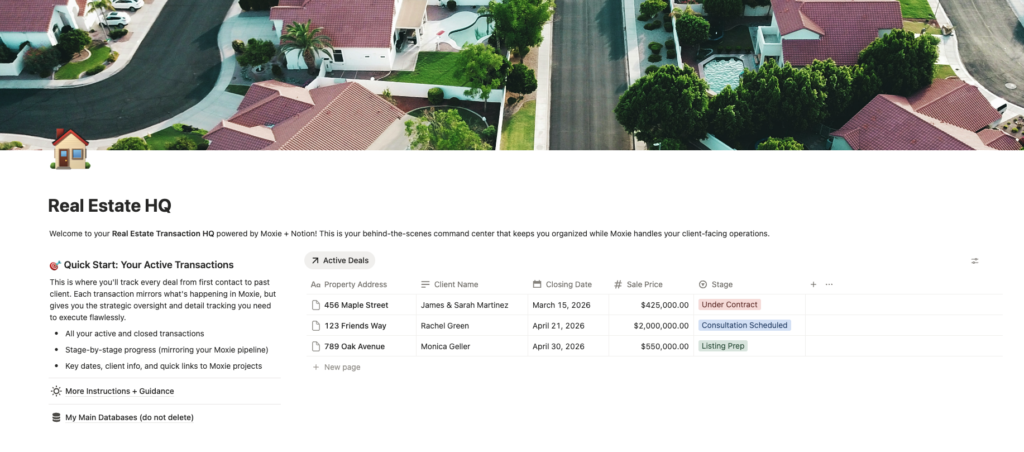
🎁 FREE Template: Real Estate Transaction HQ + Active Transactions Database
Ready to set up your Notion system in minutes? Duplicate my ready-to-use template:
- 9 properties to track everything: Property Address, Transaction Type, Stage, Client Name, Closing Date, Lead Source, Sale Price, Moxie Project Link, Notes
- 3 views: All Transactions (table grouped by Stage), Active Deals (board view), Closed & Past Clients (filtered table)
- 11 pipeline stages that mirror the real estate transaction journey (Lead → Consultation Scheduled → Agreement Signed → Active Search/Listing Prep → On Market → Under Contract → Transaction Management → Closing Scheduled → Closed → Past Client)
- Complete setup guide with expansion ideas (Vendors database, transaction checklists, neighborhood research, negotiation playbook)
Practical Notion Setups for Real Estate Agents
1. Transaction Tracker Database
Create a Notion database that mirrors your Moxie pipeline stages but adds deeper project details:
- Property address and details
- All parties involved (lenders, title, inspectors, contractors)
- Key dates and deadline countdowns
- Document checklist (inspection reports, appraisal, loan docs, repair receipts)
- Notes from calls and negotiations
- Link to the Moxie project for quick access
2. Vendor Contact Database
Stop scrambling to find that stager’s phone number or your go-to photographer’s rates. Set up a simple database with:
- Vendor name, what they do, and how to reach them
- What they charge and what’s included
- How far in advance you need to book
- Notes on past experiences working with them
- Examples of their work
- Quick-link to your Moxie form if you want them to submit details directly
3. Neighborhood Research Database
Create a page (in a database) for each area you work in frequently:
- Recent sales and how they compare
- How long homes typically sit on the market
- Who’s buying in that area
- School info and local amenities
- Key selling points you want to mention
- Photos and notes for marketing
4. Transaction Checklist Database Template
Build a master checklist you can copy for every deal:
- Week 1-2: Coordinating inspections, tracking loan applications, scheduling appraisals
- Week 2-3: Handling inspection issues, negotiating repairs, following up on loans
- Week 3-4: Confirming final loan approval, reviewing title work, prepping for closing
- Closing Week: Final walk-through, coordinating utilities and keys
For each task, note what needs to happen, who’s responsible, and when it’s due.
5. How You Work (Your Process Docs)
Write down how you do things so you’re consistent with every client:
- Questions you ask buyers in initial meetings
- How you present your services to sellers
- Your open house prep checklist
- How you handle multiple offer situations
- What you say to clients on closing day
How They Work Together in Real Life
Moxie shows you:
- Which stage each client is in
- Which contracts need signatures
- Which invoices are pending
- Who needs follow-up today
Notion shows you:
- Shows you stages/tasks/follow up information but also shows you
- Detailed checklists for each property’s unique situation
- All vendor contacts and coordination notes
- Market research informing your pricing and negotiation strategy
- SOPs ensuring nothing gets missed
- Long-term relationship tracking beyond the transaction
The Result?
You’re not drowning in details. Moxie automates the client-facing workflow, while Notion gives you the strategic clarity and organized information you need to execute flawlessly.
The Bottom Line
Moxie CRM is your transaction coordination engine. Notion is your strategic operations brain.
Together, they transform you from a stressed agent juggling too many details into a systems-powered professional who closes deals smoothly and consistently.
Ready to Stop Juggling and Start Systematizing?
If you’re tired of managing transactions with sticky notes and stress, it’s time to build systems that work as hard as you do. Enroll in The Moxie Maven Academy and save 30% when you add on Build Your Notion HQ – The Business Systems Blueprint for Web Designers at checkout!