Running a web design business means you’re not just designing pages. You’re managing inquiries, booking calls, sending proposals, getting agreements signed, collecting payments, tracking tasks, nudging clients for content, and keeping boundaries so you don’t get a “quick question” at 10:37 PM.
That’s why the right CRM matters.
Enter Dubsado and Moxie: two popular CRMs for service providers. Dubsado is a well-known option (and yes, the 3.0 redesign is prettier). But if you’re a web designer who wants a system that runs your workflow instead of giving you more tabs to manage, Moxie is the better long-term move.
Quick Snapshot: Dubsado vs Moxie
| Feature | Moxie | Dubsado |
|---|---|---|
| Workflow engine | Stage-triggered automations that push the client journey forward | Workflows are solid, but more “set it up then manage it” |
| Project delivery | Project types + templates that spin up tasks, portals, and comms fast | Projects + tasks, but more manual setup per client |
| Client portal | White-labeled + customizable experience | Functional portal, less brand-forward flexibility |
| Ongoing support | Built-in ticketing for post-launch care plans | No native ticketing (usually a workaround) |
| Customization | Custom fields + deeper personalization across pipelines, projects, and emails | Custom fields exist, but Moxie tends to go deeper in “system” setup |
👉 Verdict: Dubsado 3.0 is a nice facelift. But Moxie is the better choice if you want your CRM to act like a calm, competent operations manager (instead of another thing you have to manage).
1. Pipeline & Follow-Up — Moxie Actually Moves the Work Forward
Dubsado is project-based. You set up projects and workflows, then you still have to keep things moving.
Moxie is built around pipeline stages that can trigger automation.
Example: When a lead hits “Qualified” in Moxie, you can automatically:
- Send a discovery call scheduler
- Trigger a pre-call questionnaire
- Apply tags for segmentation
- Send reminder emails
👉 Rachel Sass Moment: Your pipeline should feel like Monica’s label maker, not Joey’s “I’ll remember later” system. Moxie is Monica.
2. Project Templates — Stop Rebuilding the Same Client Journey
If you run a signature web design package, you already know the steps are repeatable.
Moxie makes it easy to build service-based systems using project types + templates.
Here’s what a common “agreement signed” moment can look like in Moxie:
- Convert the prospect to a client
- Spin up a project from your template (tasks + subtasks + due dates)
- Trigger your onboarding emails
- Drop everything into a branded client portal
In Dubsado, you can systemize. But it’s more “assemble the parts” than “one-click client journey.”
👉 Why it matters: Every manual setup step is a chance to forget something. Moxie removes that risk.
3. Client Experience — The Portal Isn’t Optional Anymore
Clients don’t want to dig through email threads for links, files, and next steps.
Both platforms have portals, but Moxie’s portal experience tends to feel more like a branded home base:
- White-labeled portal that looks like you
- Clear project progress and next steps
- Easy file uploads and organized communication
👉 A good portal cuts down on “Where do I find…?” emails, which means fewer interruptions in your day.
4. Post-Launch Support — Ticketing Changes Everything (Especially for Web Designers)
This is where Moxie has a huge edge for designers who offer care plans.
With Moxie, you can keep project work and support work separate:
- Clients submit support requests through forms
- Tickets stay organized
- The history stays connected to the client
In Dubsado, ongoing support usually becomes a workaround (new project, shared inbox, another tool, etc.).
👉 Real talk: Care plans should feel professional and contained. Ticketing makes that possible.
5. Automation & Personalization — Systems Thinking Beats Feature Lists
Dubsado has strong workflows. But Moxie is built for stage-based automation that matches how client relationships actually progress.
Want a different journey for “Brand + Website” vs “Website Only”? Moxie makes that kind of branching system feel straightforward with:
- Custom fields
- Conditional automations
- Project templates tied to services
The Maven Method Angle: Why Moxie Fits a Web Designer’s Brain
This is the part most comparisons miss. Dubsado has features…
Moxie supports a full client experience system:
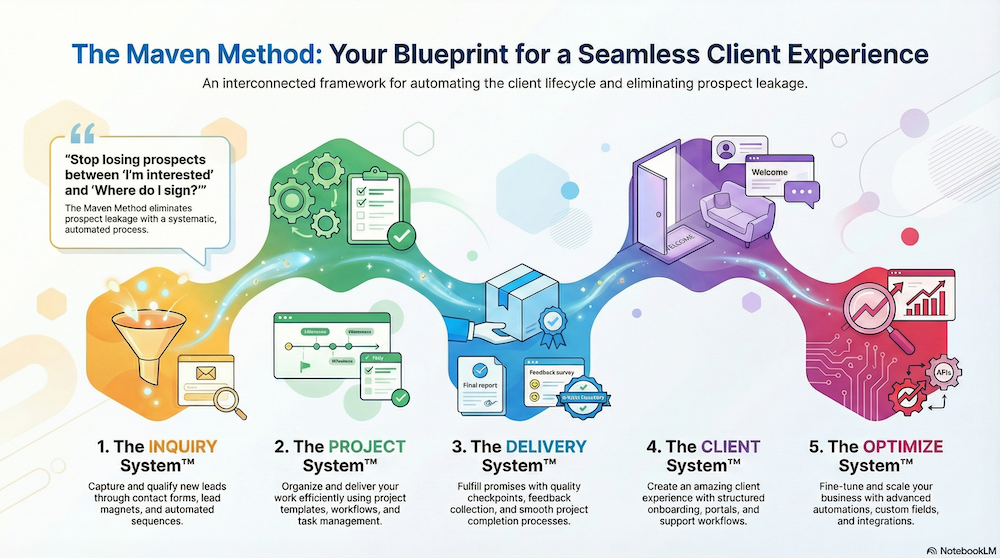
- INQUIRY System™: Stage-based pipeline that triggers the next step automatically
- PROJECT System™: Templates that keep your process consistent
- DELIVERY System™: Portals + clear milestones that reduce confusion
- CLIENT System™: Ticketing + long-term relationship management
- OPTIMIZE System™: Data and structure you can refine as you grow
What Dubsado 3.0 Gets Right (Because We’re Being Fair)
Dubsado 3.0 is nicer to use day-to-day than older versions:
- Cleaner interface
- Faster loading
- More modern feel
But here’s the issue:
A prettier dashboard doesn’t fix a messy process.
If you’re still manually moving clients along, recreating projects, and juggling post-launch support, you’ll still feel like you’re doing admin work in a nicer outfit.
Ready to Set Up Moxie the Simple Way?
If you want Moxie to feel less like “another platform to learn” and more like “oh my gosh, everything is finally in one place,” that’s what I teach.
- Try Moxie free for 30 days at yourmoxiemaven.com
- Or join the Moxie Maven Academy and get the exact pipelines, templates, and workflows I use with web designers.
👉 Could your backend BEEEEE any more calm?