Maybe you tried Notion once. Opened it up, created a few pages, then… what? You got overwhelmed by all the options, didn’t know which properties to use, and gave up after three days.
Or maybe you are using Notion—but it’s basically just a fancy Google Docs folder. Random pages everywhere, nothing connected, and you still can’t find anything when you need it.
What if you actually had a system?
One workspace where everything lives—client strategy, content planning, meeting notes, project ideas, your entire business brain. All connected, all searchable, all in one place.
No more “where did I put that file?” No more recreating work you know you did somewhere. No more scattered chaos.
Your Command Center is where your business brain lives.
The day you realize your business is running you
Let me guess.
You sit down to work, open your laptop, and immediately you’re in tab chaos.
Email. Google Drive. A client portal. A proposal doc. A notes app. A random screenshot you saved “somewhere.” Then you remember you promised a client an update… but you can’t remember if you wrote it in your planner, your inbox, or that sticky note that is now living under your coffee mug.
And the worst part?
You’re not behind because you’re lazy. You’re behind because everything is scattered.
I call this the “Where did I put that?” tax.
You pay it every day in:
- extra minutes searching
- mental energy switching contexts
- little “oops” moments that make you feel less professional than you actually are
And if you’re a web designer (or any service provider), that tax gets expensive fast.
The real pain isn’t “too much work.” It’s no home base.
Most overwhelmed business owners don’t need a new planner.
They need a command center. A home base where the full picture lives:
- what you’re working on (both in your business and for your clients)
- what’s coming up in the next week, two weeks, month
- what decisions were made – what decisions need to be made
Because when you don’t have a home base, your brain becomes the system.
And that’s… not ideal.
What “no command center” looks like (real life edition)
If you’ve ever done any of these, you’re in good company:
- You’re searching your inbox, DMs, Google Drive, and 27 open tabs trying to find “the final version” of something.
- You’re rewriting the same checklist for every project because you can’t find your last one. (Pssst, this can be solved in Notion or, even better, Moxie CRM.)
- You’re taking notes in three places, so you don’t trust any of them.
- You’re pretty sure you had a great content idea last week… but it’s gone now.
- You’ve got multiple projects moving at once, but no single place to see what’s actually on your plate—so you start Monday feeling behind before you even begin.
That’s not a personality flaw. That’s a systems gap.
Why it feels so hard (even when your business is doing well)
Here’s the part I really want you to hear: this can be happening even when your business is “fine.”
I’ve been there.
From the outside, everything looked professional. Clients were booking. Projects were moving. Money was coming in. I was giving Kum ba ya vibes. Yeah… I was looking good…
But behind the scenes? I was constantly doing that low-key panic scroll through tabs like, “Okay… where did I put the final version of that doc?” I was spending way too much time on searching rewriting, searching some more… ugh, it was a total sh$&* show!
You feel me? When your work lives in disconnected tools, three things start happening.
1) You lose visibility
You can’t make confident decisions because you can’t see everything at once. So you overcommit. Or you under-plan. Or you say yes because you forgot what’s already on your plate.
2) You waste time re-finding everything
You’re not “working” — you’re re-locating your work. And every time you switch from one tool to another, your brain has to reload the context.
It’s like paying a tiny fee every time you change apps and it adds up. Makes you feel like you’ve been drug through a knot-hole (what is that anyway 😆) at the end of every day.
3) Your business runs on memory
If you’re the only place where the plan lives, or if the place where everything lives is scattered, doing anything in your business feels overwhelming and scaling becomes impossible. Your feel like your mental energy is going way over the “high alert” line every doggone day.
And you can’t do it this way forever.
So… what is a Notion command center, really?
Not a “cute dashboard.” Not a digital planner you abandon by Thursday.
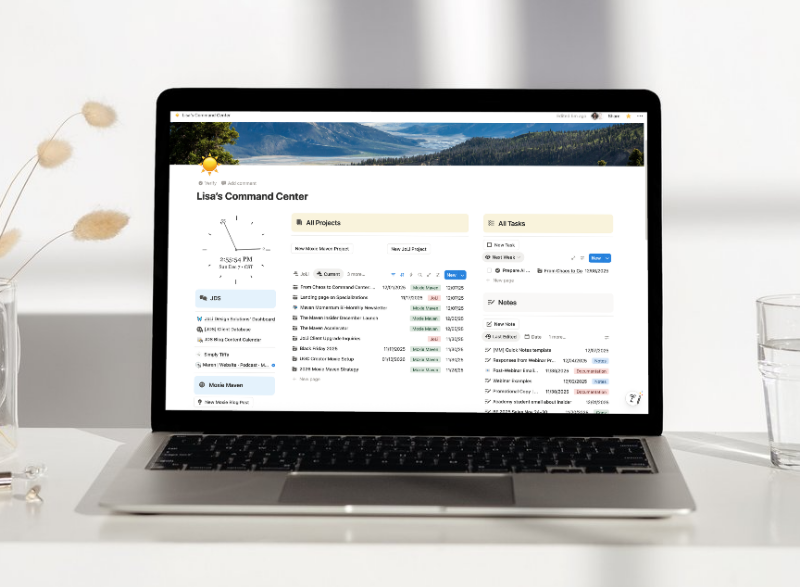
A command center is a connected workspace where you can sit down and instantly know:
- What’s happening across projects and deadlines
- What to do next without thinking too hard
- Where things live (files, links, templates, decisions)
- What you already decided so you stop re-deciding it every week
In Notion, the magic is that everything connects.
That usually looks like a few core databases working together:
- Projects
- Tasks
- Notes
- Resources
- Areas (aka the buckets of your business)
Once those are connected, your dashboards stop being “manual.”
They start being useful.
5 super-real ways web designers use a Notion command center (beyond client work)
Because yes, client projects matter… but if your backend only supports client delivery, you’re still going to feel scattered.
A real command center helps you run the whole business:
- multiple projects at once
- marketing + content
- strategy + decisions
- ops + assets
- and a light client database (so you can see what’s going on)
1) Multi-project visibility (so you stop guessing what’s “most important”)
Most web designers aren’t running one project.
You’ve got:
- active client work
- a sales page refresh
- a course or freebie
- content batching
- admin + finances
A command center gives you one place to see:
- what’s active right now
- what’s due soon
- what’s blocked
- what’s waiting on someone else
Translation: you make decisions from the full picture, not vibes.
2) A content engine that doesn’t rely on your memory
Notion is incredible for turning “random inspiration” into a real content plan.
Think:
- idea capture (fast)
- drafts (in one place)
- a simple workflow (idea → drafting → editing → scheduled → published)
- a place to save hooks, CTA variations, and reusable frameworks
Translation: you market consistently, even when client work gets busy.
3) A strategy hub for offers, launches, and decisions
This is the part most people don’t build… and it’s why their brain feels overloaded.
A command center can hold:
- offer messaging
- launch timelines
- campaign notes
- “what worked / what didn’t” debriefs
- decisions you don’t want to re-decide every month
Translation: you stop reinventing your business every Monday.
4) An operations + templates library that actually gets used
This is where Notion becomes the place you go to run things:
- SOPs
- checklists
- onboarding steps
- project templates (yes)
- your standard links + tools + process notes
Translation: repeatable work becomes easier (and faster).
5) A “light” client database (just enough to stay oriented)
This does not have to be a full CRM inside Notion.
But it’s so helpful to have a simple place that shows:
- client name
- current status (active / paused / completed)
- project link(s)
- notes or “last touch”
Translation: you can answer “What’s going on with everyone?” without opening 12 tabs.
Notion + Moxie: different jobs, best friends
This is my favorite combo because it’s simple.
- Moxie = client operations + delivery communication (inquiry → pipeline → agreement → invoice → portal → project)
- Notion = business operations + planning + knowledge + content + oversight (dashboards, assets, notes, decisions)
You don’t need 17 platforms.
You need two systems that each do their job really well.
“Cool… but every time I open Notion I get overwhelmed.”
Same. I’ve been using Notion for several years and have finally cracked a code. 👩💻 Notion is amazing, but the blank page is a little too… anything-is-possible.
If you’ve ever:
- downloaded a template and never touched it again 🙋🏻♀️
- built something pretty that didn’t actually help 🤦🏻♀️
- created way too many databases and still felt scattered 😩
It’s not because you can’t do Notion.
It’s because you need a build plan that’s simple enough to finish.
Build your Notion command center (with a roadmap)
If you want a step-by-step process to build a Notion command center designed specifically for web designers and service providers, my course walks you through it.
Inside the course, you’ll build:
- your core databases (Projects, Tasks, Notes, Resources, Areas)
- connected dashboards that show you what matters
- a system that supports client work and content creation
Ready to build the whole thing with a clear roadmap?